Model Evaluation
Model evaluation takes place after training and before continuous real-robot execution, answering two questions:
-
Whether the model has learned the task;
-
Whether the model can run correctly and safely on the target robot.
Evaluation order
-
Checkpoint loading check: The model, processor, configuration, and normalization files can be fully loaded.
-
Data replay/offline inference: Run on test episodes to verify that the input and output structures are correct.
-
Open-loop evaluation: Compare predicted actions with ground-truth actions in the dataset without executing them on the robot.
-
Input/output alignment: Check cameras, states, actions, coordinate frames, units, and frequencies.
-
Inference performance: Check inference latency, GPU memory usage, throughput, and action horizon.
-
Controlled real-robot rollout: Low speed, motion limits, short duration, with emergency stop available at any time.
-
Result logging: Record statistics on successes, failures, timeouts, and human interventions.
Start WebSocket inference service
Using the script is recommended:
bash scripts/run_serving.sh \
  --checkpoint-path /path/to/checkpoint \
  --train-config-path /path/to/my_robot_config.yml \
  --port 32195
Default connection address:
ws://127.0.0.1:32195
The default wrapper returns the raw model action chunk and is suitable for open-loop evaluation. If the client requires serialized robot actions, use --serialize-actions as described in the script.
Advanced startup method:
export ENABLE_CUDA_GRAPH=True
export ENABLE_EXPERIMENTAL_INFERENCE_ENGINE=True

CKPT_PATH=/path/to/checkpoint

python -m wall_x._vendor.harrix.serving.launch_serving \
  --env X2ROBOT \
  --port 32195 \
  --no-serialize-actions \
  model-config:server-model-config \
  --model-config.checkpoint-path "$CKPT_PATH" \
  --model-config.train-config-path /path/to/my_robot_config.yml \
  --model-config.action-horizon 32 \
  --model-config.robot-action-interpolate-multiplier 1 \
  --model-config.robot-action-end-ratio 1.0 \
  --model-config.robot-type desktop
robot-type desktop comes from the desktop robotic arm example in the source deployment document. QUANTA X1 Pro should use a configuration consistent with the target robot, training data, and SDK Adapter; the example values should not be copied directly.
Open-loop validation
Start the inference service first, then open a new terminal and run:
python scripts/draw_openloop_plot.py \
  --uri ws://127.0.0.1:32195 \
  --dataset-root /path/to/your_robot_dataset \
  --train-config /path/to/my_robot_config.yml \
  --episode-indices 0,1,2 \
  --save-dir ./openloop_plots
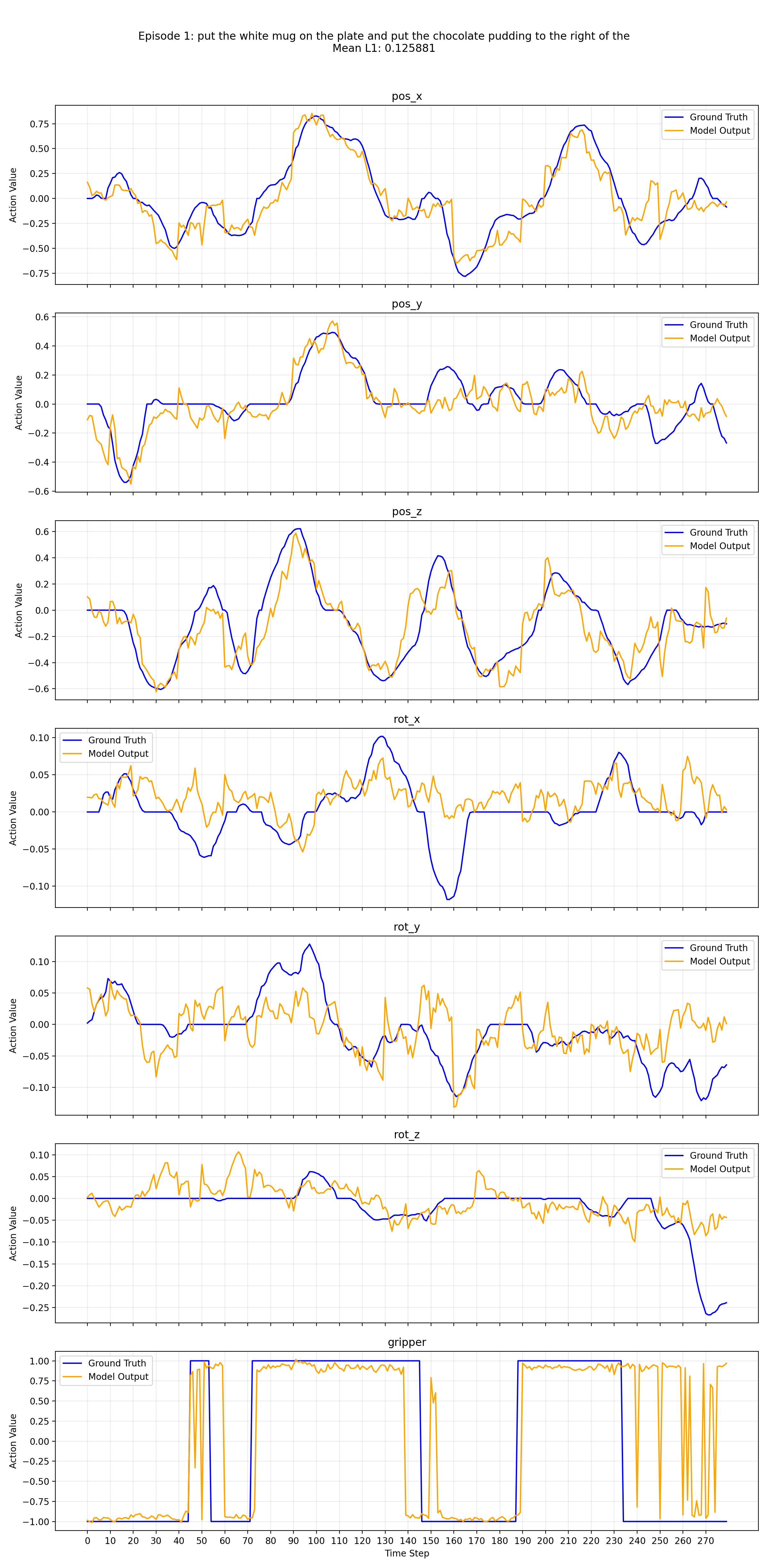
The results will be saved to ./openloop_plots. The focus of the check is not complete curve overlap, but rather:
-
Action dimensions, directions, and ranges are reasonable;
-
Key action phases are roughly consistent with the demonstrations;
-
No abnormal spikes, sustained saturation, or significant delays;
-
The timing sequence between the gripper and end-effector actions is reasonable.
Open-loop example
Real-robot evaluation metrics
-
Task success rate/Task progress: Whether the task is completed, or to which stage it has progressed.
-
Completion time: From task start to success or stoppage.
-
Failure types: Perception, grasping, trajectory, placement, timeout, network, system, etc.
-
Human intervention: Emergency stop, takeover, reset, or manual correction.
-
Inference latency: Latency for a single inference or a single action chunk.
-
Control stability: Jitter, jump, out-of-bounds, and action discontinuity.
Different tasks may define different success criteria. At this stage, pipeline acceptance still focuses on whether the data → training → inference → real-robot execution chain is correct, without mandating a uniform success rate threshold for all tasks.